Chrome extension · Live voice translation · 77 languages
Hear the world in your language.
Videos, lectures, podcasts and meetings in Chrome, translated by voice in real time. No subtitles to read: press a button and listen.
no card · Google sign-in
- Your audio isn't stored
- No lock-in
- 77 languages
How do I listen to a video in Spanish — or Japanese, or French — translated into my language?
Install a voice-translation extension in Chrome — Vozelle, for example. Open the video in a tab, pick your target language and hit Translate. The extension captures the tab's audio and plays a translated voice over it, in real time. No subtitles to read: you listen.
Open a tab with sound
YouTube, a lecture, a podcast, a meeting on Meet or Zoom web.
Pick the language and hit Translate
The languages you use are one tap away; the rest are in the search. The source language is detected automatically.
Listen
The translated voice plays over the original, like an interpreter by your side.
Listen in which language?
Pin Vozelle to your Chrome toolbar
Once installed, the extension hides behind the puzzle-piece icon in the top-right corner. Pin it once and it stays in sight — three clicks.
- Click the puzzle piece, to the right of the address bar.
- Find Vozelle in the list and click the pin.
- Done: the icon stays visible.

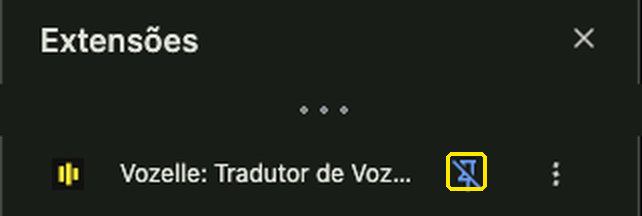 In the screenshot the pin is blue because the extension is already pinned. In your Chrome it will be empty — that is the one you click.
Reading subtitles for 40 minutes is work. Listening isn't.
With subtitles
Eyes glued to the bottom of the screen. You miss the picture, and fatigue builds up.
With Vozelle
A translated voice over the original, like a live interpreter. You keep watching, and just listen.
The original stays underneath. You control how much.
The translation plays over the original sound, like a voice-over — and the original ducks on its own when the voice speaks. Try it:
If it plays in a Chrome tab, it works.
Outside Chrome, it doesn't. And honestly, for several of these cases the right answer isn't Vozelle.
Works
- YouTube
- Twitch
- Vimeo
- Podcasts in the browser
- Google Meet in the browser
- Zoom web (zoom.us)
- Teams web
- Webinars and live streams
- Online courses
- Local files in a tab
Doesn't work
- Zoom desktop
- Teams desktop
- Discord
- Slack
- VLC
- Spotify desktop
- Your microphone
- Safari / Firefox / Edge
→One-way: you hear the others translated; they don't hear you. Built for watching and following along, not for interpreting a conversation.
| What you want to do | The right tool |
|---|---|
| Read articles, PDFs and web pages | Immersive Translate |
| Study languages with bilingual subtitles | Language Reactor |
| Two-way, face-to-face conversation | Interpreter apps on your phone |
| Listen to a video, lecture or podcast without reading | Vozelle |
| Follow browser meetings by voice | Vozelle |
How much does it cost?
Every translated minute has a real compute cost — that's why there's no "unlimited", from any serious provider.
Lite
For a video or a lecture now and then.
Pro
For anyone following courses or meetings every week.
Power
For daily use.
Credits
No subscription. The minutes never expire.
No lock-inCancel yourself, anytimeStays active until the end of the period you've paid forCredit minutes never expireHow do I cancel? →
What people usually ask
What's the translation latency?
About 3 to 3.5 seconds between the original audio and the translated voice, measured in real use. That's comfortable for watching and following along; there's no lip sync. For instant back-and-forth conversation, it's not the right tool.
Which Portuguese does it translate into?
The Portuguese available as a target language is Brazilian Portuguese. The translation model doesn't produce European Portuguese reliably, so we'd rather be upfront: if pt-PT is essential for you, Vozelle isn't the right tool yet.
Does it work with desktop Zoom or Teams?
No. Vozelle only captures audio from Chrome tabs. Zoom works if you join through the web version (zoom.us in the browser), and Teams through its web version (teams.microsoft.com). Desktop apps are out of reach for any Chrome extension.
Can I cancel my subscription? How?
Yes — anytime, with no lock-in, no questions asked, and no need to talk to anyone. Vozelle payments are processed by Stripe/Link, the official merchant of record (it shows as LINK.COM* VOZELLE on your card statement), and that's where you manage your subscription:
- Sign in at app.link.com/recurring with the email you used for the purchase. If you checked out as a guest, create a Link account with that same email — the receipt you received gives you access.
- In the "Recurring" section, select the Vozelle subscription.
- Click "Manage subscription" and follow the steps to cancel (official Link guide).
Your subscription stays active until the end of the period you've already paid for.
Do unused minutes expire?
Credit minutes (€5/€12) never expire and don't require a subscription. Monthly subscription minutes renew each cycle and don't roll over to the next month. And if you have both, we spend the monthly quota first — your credits stay in reserve, untouched, even if you later cancel the subscription.
Does the other person in the meeting hear me translated?
No. Translation is one-way: you hear the others in your language; they hear you as usual. Vozelle is for following and understanding, not for interpreting a two-way conversation.
Is my audio stored?
No. The tab's audio is streamed encrypted, translated in real time and discarded. Nothing is recorded or used to train models. The privacy policy has the details.
Why is Google sign-in required?
Every translated minute has a real compute cost. Sign-in keeps the free trial from being drained by anonymous abuse — it's what lets us give everyone 10 minutes without asking for a card.
Which languages are available?
77 target languages — including Spanish, Portuguese (Brazil), French, German, Italian, Japanese, Korean, Chinese, Arabic, Hindi and Ukrainian. The source language is detected automatically.